Badminton Drop-in Queue Manager
Lightweight web app for shared passcode registration, court queueing, and group visibility
Personal / Community Tool
2026
Solo Product Developer / Frontend Developer / Backend Developer
Context
A lightweight badminton drop-in management web app built to solve passcode registration and court queue coordination for a large community group, replacing message-thread updates with a shared live dashboard.
My Contribution
Designed and implemented the full web app, then used Figma Make and live user feedback to redesign the mobile UI after launch. The system includes the passcode pool, court queue logic, group sharing, optional Google login, admin permissions, Turso-backed persistence, and Vercel Serverless API.
Impact / Outcome
Moved a busy badminton group's passcode and court coordination out of chat messages and into a shared web workflow. The app has been in active use for several weeks by a primary group of about 500 members, with registration behavior becoming more self-service and transparent.
Outcome Summary
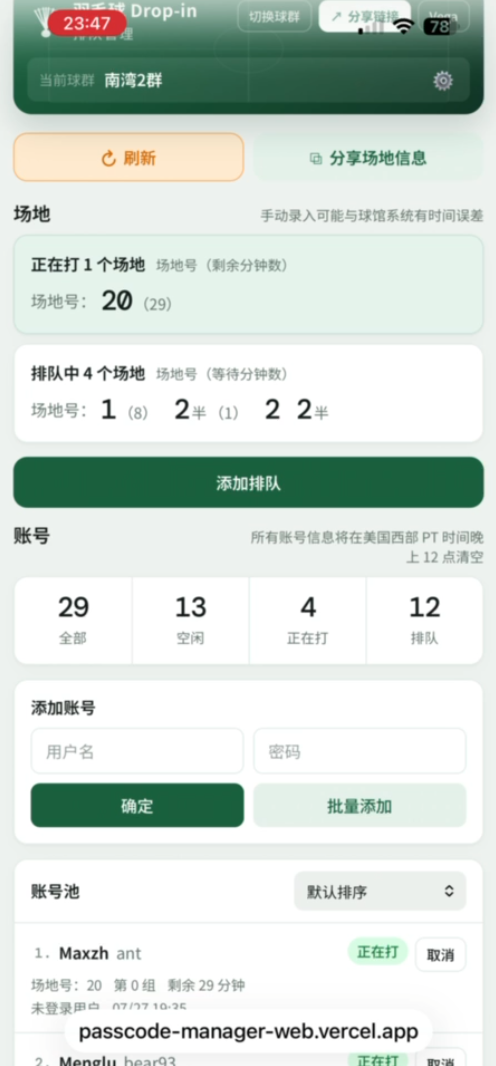
Badminton Drop-in Queue Manager
Redesigned mobile UI created with Figma Make after the initial launch
This project started from a very practical community problem. In my badminton group, busy drop-in sessions often became hard to coordinate once many people were playing at the same time. Players needed to register usernames and passwords, keep track of which accounts were already in use, know which courts were playing, and understand who was waiting next. We could post updates in the group chat, but those messages were quickly buried by new conversation.
I built this web app as a lightweight shared operations tool for that workflow. Instead of relying on scattered chat updates, the group now has a live page where members can add passcodes, see current account status, register court queues, and understand the whole session at a glance.
The app has been in active use for several weeks. The primary rollout is currently one badminton group with about 500 members. Other groups can use the system as well, although I have not broadly promoted it outside the first group yet.
After the initial release, I continued collecting feedback from regular users and used Figma Make to redesign the mobile interface. I scheduled updates around active use and rolled out changes incrementally, allowing the product to improve without interrupting the group's established workflow.
Table of Contents
- Overview
- Problem
- Product Goals
- Post-Launch UI Iteration
- User Workflow
- Queue and Court Logic
- Account Pool and Bulk Entry
- Groups, Identity, and Permissions
- Backend and Deployment
- Outcome
- Future Improvements
Overview
The app is a small full-stack web tool for badminton drop-in coordination. It is built with plain JavaScript, HTML, and CSS on the frontend, with a Vercel Serverless API on the backend. Production data is stored through Turso/libSQL, while local development can fall back to an in-memory store.
Core features include:
- Creating or joining badminton groups through shared links.
- Adding passcode accounts into a shared pool.
- Sorting accounts by idle, playing, or queued status.
- Registering court queues with 2-player half-court or 4-player full-group entries.
- Filling an existing half-court group.
- Cancelling half or full groups and rescheduling the remaining queue.
- Showing current courts, queued courts, remaining minutes, and estimated wait time.
- Optional Google login for editing owned entries, saving display names, and tracking personal play history.
- Daily cleanup of account and queue data at midnight PT.
The goal was not to build a large platform. The goal was to make a narrow, reliable tool that matched how the group already behaves during real drop-in sessions.
Problem
The original workflow lived in chat. That worked when only a few people were playing, but it broke down during larger sessions:
- New passcode entries were mixed into unrelated messages.
- Players could not easily see which accounts were already used.
- Court queue updates were difficult to reconstruct from chat history.
- Half-court situations needed manual explanation.
- People joining later had to ask for the current state again.
- The same information was repeated many times by different players.
The friction was not technically complex, but it was operationally expensive. The group needed a shared source of truth that was faster than asking in chat and simple enough for casual players to use on a phone.
Product Goals
I designed the tool around a few constraints:
- It had to be mobile-friendly because most players check it at the gym.
- It had to be understandable without onboarding.
- It had to tolerate partial participation. Not everyone wants to log in.
- It had to preserve accountability where needed. Logged-in users should be able to edit their own entries.
- It had to support real badminton queue behavior, including half-courts and manual time estimates.
- It had to reset daily because passcodes and court queues are session-specific.
- It had to be simple to deploy and inexpensive to run.
That led to a compact UI with a court section first, an account status summary, an add-account form, and a sortable account pool. The most important session state is always visible without digging through menus.
Post-Launch UI Iteration
I treated the first release as the start of the product feedback loop rather than the end of development. Once members began using the app during real drop-in sessions, I listened to their comments and used that input to identify where the interface could communicate state more clearly and make common actions faster on a phone.
I used Figma Make to redesign the UI, then introduced the changes incrementally at suitable moments after launch. The updated interface establishes a clearer hierarchy between active courts, queued courts, and the account pool; makes account status counts easier to scan; provides larger mobile touch targets; and improves access to refresh, group switching, venue sharing, and other frequently used actions. I also continued making smaller adjustments as new feedback came in.
This iteration process was especially important for a community of roughly 500 members. Even a small ambiguity can lead to repeated questions or incorrect queue entries during a busy session, so each change needed to remain familiar to existing users while making the shared state easier to understand at a glance.
User Workflow
A typical session looks like this:
- A member opens the shared group link.
- Players add their username and password to the shared account pool.
- The dashboard shows all accounts and their current state: idle, playing, or queued.
- When a court is available or a group wants to queue, members select 2 or 4 idle accounts.
- They enter the court number, the current group's remaining minutes, and the target queue group.
- The app calculates whether the selection becomes the current playing group, a queued group, or a half-court completion.
- Other players can refresh the dashboard and immediately see who is playing, who is waiting, and when accounts are expected to become available.
This turns a chat-based coordination problem into a visible state-management problem.
Queue and Court Logic
The queue system is the most domain-specific part of the app. It models each court as an ordered set of queue entries. Each entry can be:
playing: currently on court.queued: waiting for a future slot.finished,cancelled, orcleared: inactive historical states.
Each queue entry can contain 2 or 4 passcodes. A 2-player entry represents a half-court group, which can later be completed by another 2-player selection. The app prevents duplicate account selection, blocks non-idle accounts from being queued again, and checks whether the target group is already full.
When entries are added or cancelled, the backend recalculates that court's schedule. It advances expired playing entries, promotes queued entries when a court becomes free, and updates each account's status, court number, group number, and available time.
I also added a practical manual override: players can type the remaining minutes for the current group. The app then estimates wait time for later groups from that value. This is intentionally simple because the system cannot automatically read court data from the physical venue.
Account Pool and Bulk Entry
The account pool is the main shared resource. Each account stores username, password, status, current court, current queue entry, creator identity, and timestamps.
For single entries, the UI validates that usernames and passwords use alphanumeric characters only. For larger sessions, I added a bulk paste flow because the group often receives numbered chat-list style entries. The parser can read pasted rows, detect duplicate usernames, ignore unchanged entries, and separate new accounts from updates before submission.
The backend enforces the same rules as the frontend:
- No duplicate active usernames inside the same group.
- Only idle accounts can be edited or deleted.
- Logged-in users can modify accounts they created.
- Admins can manage broader group data.
- Each bulk submission is capped to avoid accidental oversized writes.
That split keeps the UI friendly while still protecting the shared state from inconsistent edits.
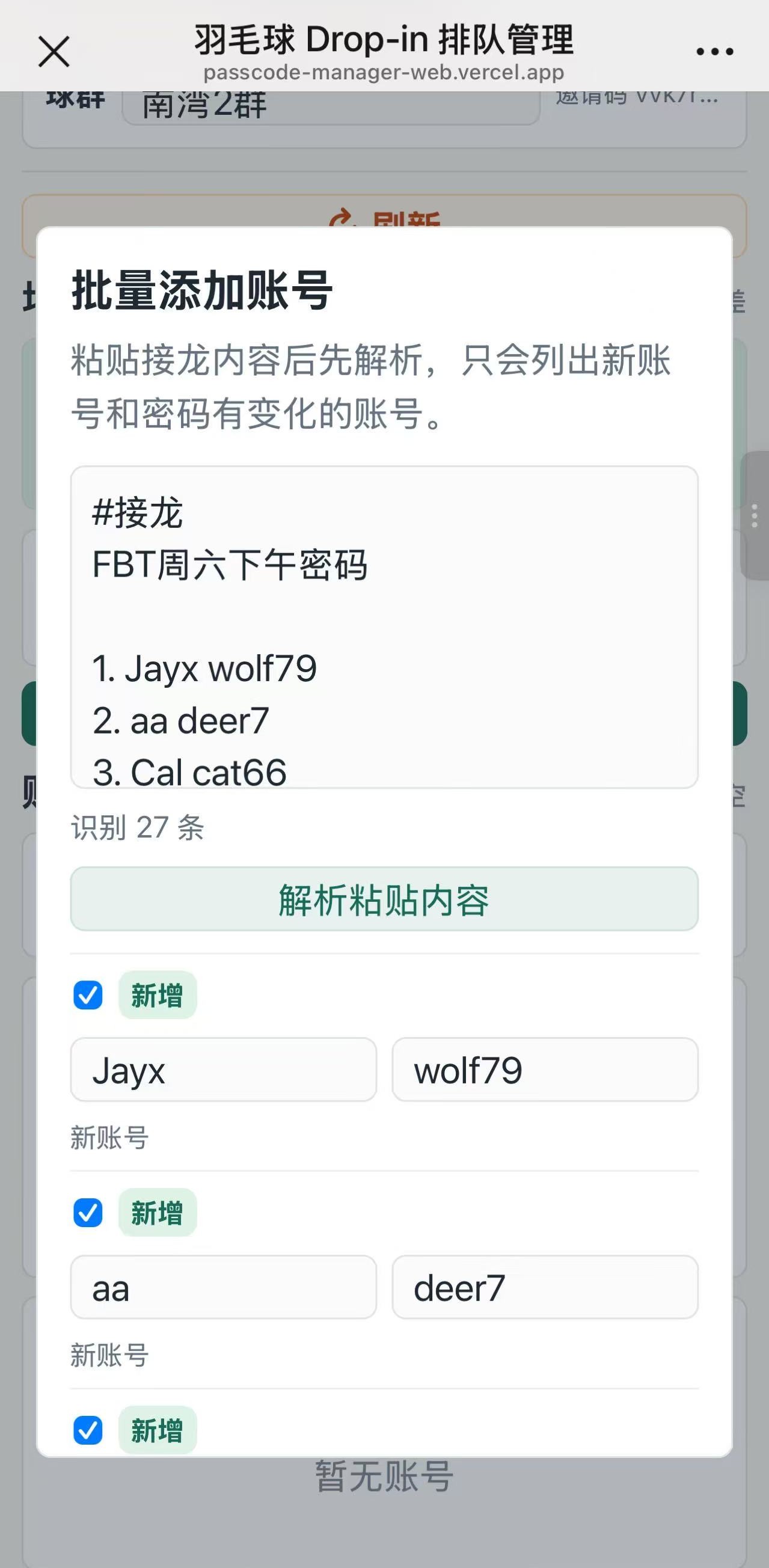 Iteration Added Bulk Entry
Groups, Identity, and Permissions
The system supports multiple badminton groups. Each group has an ID, name, member list, owner/admin information, and shareable invite link. Joining a link adds the current member or logged-in user to that group.
Login is optional. Unauthenticated users can still participate through a local member ID, which lowers friction for casual use. Google Sign-In adds more persistent identity:
- Display name management.
- Remembered group participation.
- Ability to edit or delete the user's own logged-in entries.
- Personal play-history tracking.
- A small heatmap showing recent activity.
There are also admin layers for group management. Group admins can update group settings and manage group-specific permissions, while the super-admin path can manage global admin lists and remove groups when needed.
Backend and Deployment
The backend is a single Vercel Serverless API route with action-based POST requests. The app does not require a build step, which keeps deployment straightforward.
The data layer uses a pragmatic state-store approach:
- In production, state is serialized into a Turso/libSQL table.
- In local development or unconfigured deployments, the app falls back to in-memory storage.
- The same normalized state shape is used across groups, credentials, queue entries, users, sessions, operation logs, play history, and admin emails.
This is not a large relational model, but it is appropriate for the size and update pattern of the tool. The app needs fast iteration, simple deployment, and reliable shared state more than complex analytics.
Daily cleanup is handled in the application layer using America/Los_Angeles date logic. When the app advances state, it clears old active accounts and queue entries from previous PT days, which matches how the badminton sessions are organized in practice.
Outcome
The biggest improvement is behavioral. After several weeks of use, members have started registering passcodes and court information directly in the app instead of relying only on chat. The current state is visible to everyone, which reduces repeated questions and makes larger sessions easier to coordinate.
For the first active group of about 500 members, the app has become a shared operational surface:
- Passcodes are easier to scan and sort.
- Court status is visible without searching chat history.
- Queue order is more explicit.
- Half-court cases are easier to complete or cancel.
- New updates are not lost under unrelated messages.
As a personal project, this was also a useful exercise in building a small product around a real social workflow. The technical challenge was not any one algorithm; it was designing the right amount of structure for a casual, high-friction, real-world process.
The live rollout also created a direct design feedback loop. Instead of guessing how the interface should work, I could release focused changes, hear how members responded, and continue refining the UI around observed community needs.
Future Improvements
The next improvements I would consider are:
- Better audit views for admins when a busy session has many edits.
- A read-only public display mode for showing court status on a larger screen.
- More robust conflict handling if multiple people submit queue changes at nearly the same time.
- Optional notifications when a queued group is close to playing.
- Cleaner onboarding copy for groups outside the original community.
- A more normalized database model if adoption expands beyond the first group.
The current version is intentionally lightweight, but it has already proved the core workflow: give the group one shared state surface, make updates fast, and keep the queue understandable under real usage pressure.
Related Projects
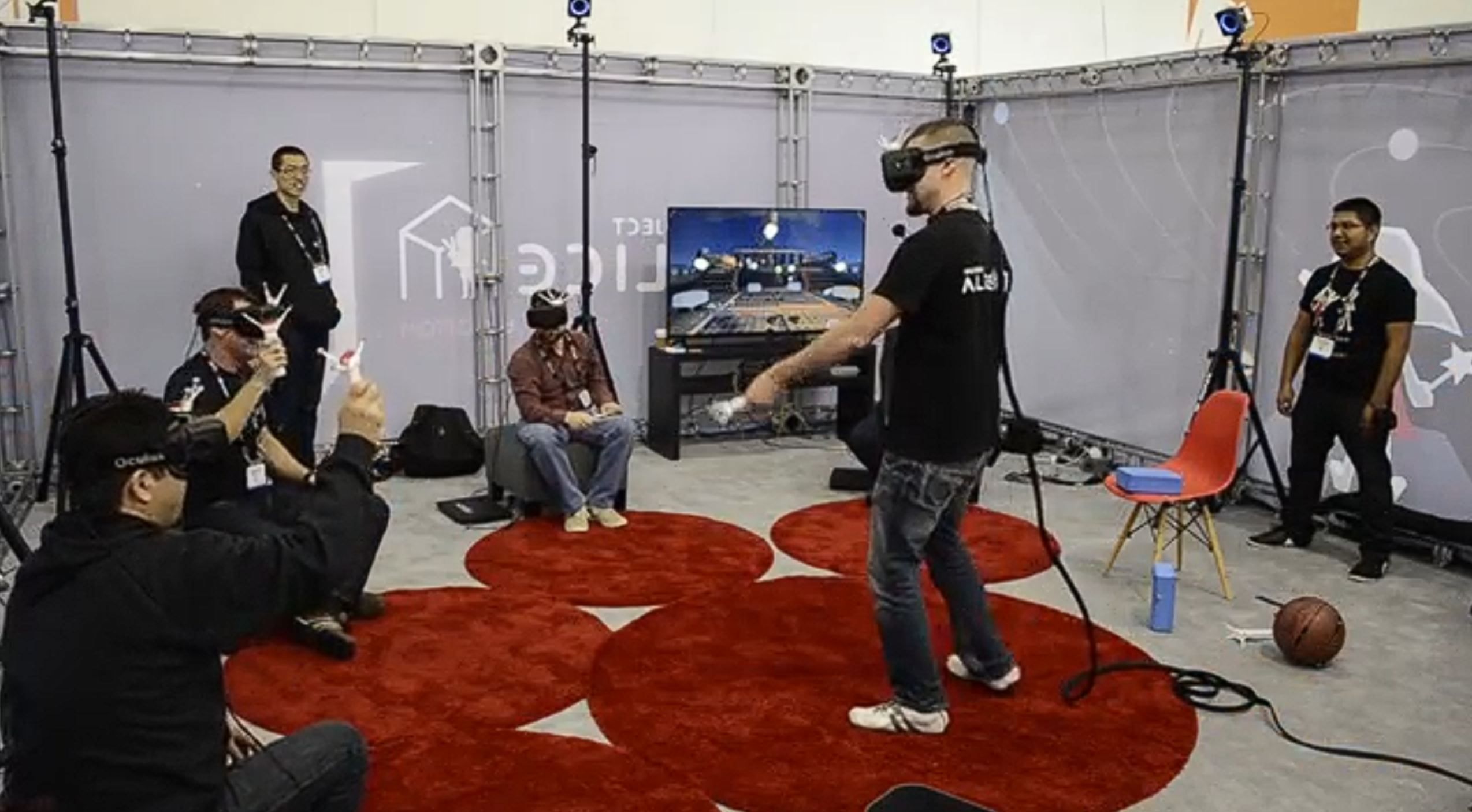
Project Alice
Noitom Beijing · 2016
High-end multi-user VR platform with tracked props and full-body motion capture
Impact
Contributed production-ready technical art assets and effects for demos that showcased Project Alice's multi-user VR, tracked prop, and motion-capture capabilities.
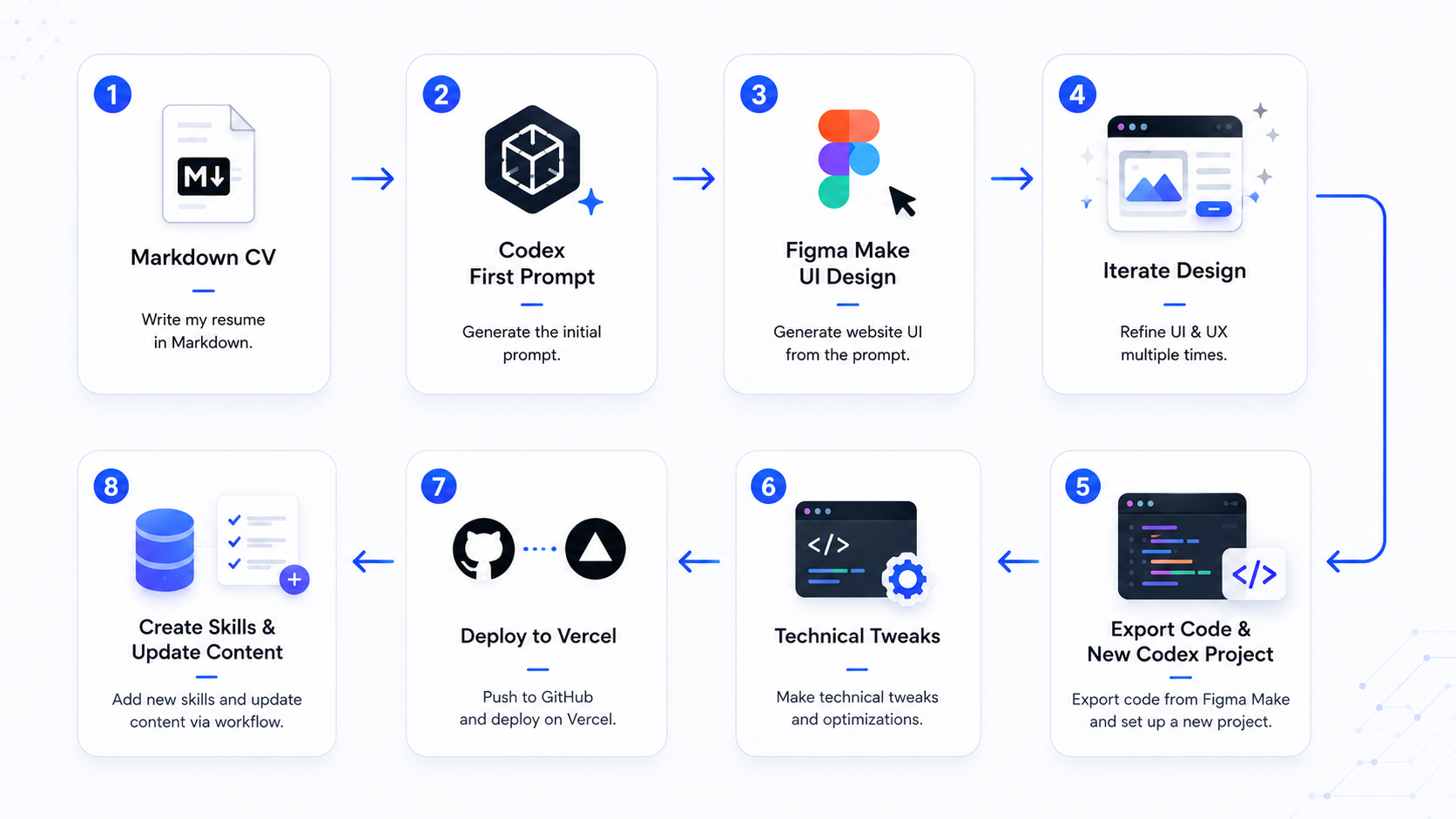
Vega Bai Portfolio Website
Personal Project · 2026
AI-assisted portfolio system for presenting technical art, pipeline tools, and production case studies
Impact
Turned a resume and scattered project history into a focused, maintainable portfolio system that presents technical art experience through production problems, pipelines, tools, and outcomes rather than only visual results.