Vega Bai Portfolio Website
AI-assisted portfolio system for presenting technical art, pipeline tools, and production case studies
Personal Project
2026
Technical Artist / AI-Assisted Designer / Frontend Developer
Context
A production-minded portfolio website built from an AI-assisted Figma Make design workflow, then refined into a React/Vite content system for presenting Senior Technical Artist work clearly to game, technology, and AI-industry recruiters.
My Contribution
Directed the design prompt, iterated the visual system and information architecture, exported the Figma Make result into a maintainable React/Vite site, then continued developing project pages, Markdown content workflow, media handling, and technical-art case-study framing.
Impact / Outcome
Turned a resume and scattered project history into a focused, maintainable portfolio system that presents technical art experience through production problems, pipelines, tools, and outcomes rather than only visual results.
Outcome Summary
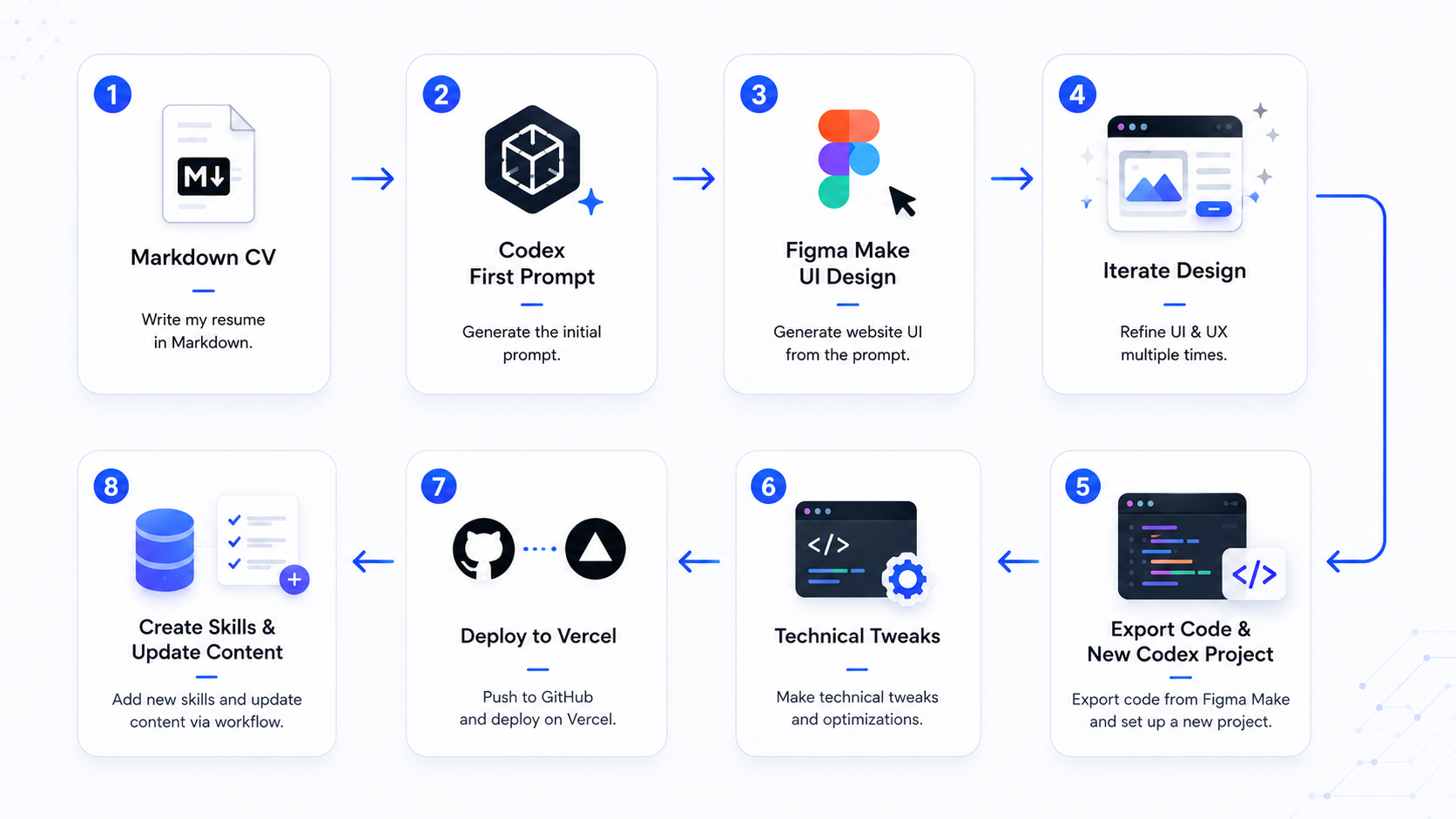
Vega Bai Portfolio Website
Vega Bai Portfolio Website flowchart
This portfolio website is both a presentation surface and a small product-design project. It started as a Figma Make workflow driven by my resume, technical art background, and job-search goals, then evolved through several rounds of visual-system and architecture refinement before being exported into this React/Vite codebase for continued development.
The goal was not only to make a good-looking personal site. The more important problem was strategic: represent my work as a Senior Technical Artist in a way that is clear to recruiters, hiring managers, art directors, technical art directors, and engineering-adjacent teams. The site needed to communicate pipeline thinking, tool development, shader/VFX awareness, production constraints, and practical senior-level judgment without turning into a dense resume page.
Table of Contents
- Overview
- Goals and Constraints
- Prompt-Driven Design Direction
- Information Architecture
- Implementation and Content Pipeline
- Technical Art Positioning
- Iteration and Validation
- Outcome
- Future Improvements
Overview
The site was originally generated in Figma Make from an AI-authored first prompt based on my resume and professional positioning. After that first pass, I directed several rounds of changes to correct both tone and structure: the site needed to feel more premium, darker, more technical, and more specific to game-development production work.
The final direction moved away from a generic portfolio or clean white SaaS look. Instead, the design uses a dark navy technical-art atmosphere with controlled cinematic lighting, project modules, pipeline traces, subtle HUD-like details, and strong contrast for readability.
The project now works as a portfolio system with:
- A recruiter-friendly homepage and project grid.
- Technical project detail pages framed as case studies.
- Reusable metadata for role, company, year, category, tags, contribution, highlights, impact, and related work.
- Markdown-authored project articles for longer technical breakdowns.
- A local content build pipeline that validates project metadata and media references.
- A visual language that supports pipeline automation, DCC/engine integration, Unreal tooling, and production problem-solving.
- A small Three.js integration that let me test interactive technical atmosphere in a controlled portfolio context.
Goals and Constraints
The main design constraint was content clarity. The site needed a strong technical identity, but the visual system could not overpower the work. A portfolio for technical art roles must scan quickly and still reward deeper reading.
The project had several concrete goals:
- Present me as a Senior Technical Artist with real production experience, not just a generalist artist or frontend hobbyist.
- Organize projects around problems solved, systems built, production impact, and collaboration context.
- Preserve the existing Figma Make direction while improving specificity and maintainability in code.
- Keep the design cinematic and game-tech flavored without drifting into noisy cyberpunk decoration.
- Support both visual projects and less image-heavy pipeline/tool projects.
- Make future project articles easy to add without manually editing app data.
That last goal became important quickly. Many technical-art projects are difficult to explain with a single thumbnail. The site needed room for diagrams, tool screenshots, process descriptions, and pipeline-focused writing.
Prompt-Driven Design Direction
One of the most useful parts of the process was treating the Figma Make prompt like a creative brief. The prompt did not just ask for a style. It defined what the site should communicate and what failure modes to avoid.
The later design prompt pushed the site toward:
- Deep navy, blue-black, charcoal, and muted steel surfaces.
- Subtle cyan highlights with restrained violet, green, and amber status accents.
- Thin grid lines, data-flow traces, node links, and pipeline/HUD motifs.
- Project cards that feel closer to production modules or build-pipeline panels.
- Technical labels such as import, validate, optimize, export, and deploy.
- A compact pipeline signature: DCC Tools -> Asset Validation -> Optimization -> Unreal / Runtime.
- Project pages structured as technical case studies rather than gallery pages.
The prompt also included negative direction: avoid a mostly white layout, excessive neon, crypto-dashboard styling, unreadable transparent cards, or decorative effects that compete with content. That mattered because the portfolio should feel senior and production-aware, not visually loud for its own sake.
Information Architecture
The site architecture was shaped around how hiring teams usually evaluate technical art work. A recruiter may need a quick scan, while a technical art director may want implementation detail, pipeline decisions, and evidence of ownership.
The current structure supports both paths:
- The homepage introduces my positioning, demo reel, resume CTA, technical focus areas, and project cards.
- The project grid filters work across pipeline, tools, game, VR/interactive, experimental, and personal categories.
- Project cards surface title, company, year, tags, category, thumbnail, and a concise tagline.
- Project detail pages provide a hero media area, metadata panel, tags, contribution summary, technical highlights, impact, and related projects.
- Markdown project articles allow deeper technical explanations without bloating the core React data file.
For tool and pipeline projects, this structure is especially important. It lets a project lead with production context, then move into the system design and implementation details that show senior-level judgment.
Implementation and Content Pipeline
After export, the Figma Make result became a React/Vite project. The ongoing work has focused on turning the exported design into a maintainable portfolio codebase rather than a one-off static mockup.
The implementation uses:
- React and Vite for the app shell and build workflow.
- TypeScript-flavored project data contracts.
- Tailwind and local theme files for the dark technical visual system.
- Radix/shadcn-style UI components for common interaction patterns.
- Three.js atmosphere used subtly behind content.
- React Markdown with heading IDs for long-form case studies.
- A generated project-data layer built from Markdown frontmatter.
The content workflow is intentionally production-like. Project articles live in content/projects/*.md, with required frontmatter fields such as slug, title, tagline, year, role, category, tags, thumbnail, description, contribution, technical highlights, impact, and related projects. A local build script parses the Markdown, validates image references, rewrites Blob-hosted media URLs, and generates src/data/generated/projects.generated.ts.
That gives the portfolio a lightweight CMS pattern without adding a full CMS. New projects can be written as Markdown, checked at build time, and merged into the same project list as legacy data.
I also wanted to integrate Three.js because I found the library genuinely exciting and wanted a practical reason to learn it. This portfolio was a good small test bed: the 3D layer could stay lightweight, atmospheric, and non-critical, while still giving me hands-on experience with how Three.js fits into a React site. My longer-term interest is to apply that knowledge to future interactive tools, technical visualizations, and real-time web experiences where 3D can clarify a system rather than simply decorate it.
Technical Art Positioning
The most important content shift was from "look at these projects" to "here are the production problems I solved."
That framing better matches my background:
- Pipeline tool development for Unreal, Core, Maya, Substance Painter, and Perforce-connected workflows.
- Asset validation and automation systems that reduce repetitive setup work and catch problems earlier.
- Shader, VFX, lighting, and real-time content work across games, VR, and immersive projection.
- Cross-discipline support between artists, designers, engineers, marketing, and production teams.
- AI-assisted development and iteration used as a practical workflow accelerator.
The portfolio itself mirrors that positioning. It is built as a small content pipeline, with structured data, generated output, media validation, reusable project modules, and an explicit design system. That makes the website an example of the same thinking it describes: clarify the goal, build a repeatable system, keep the content readable, and leave room for iteration.
Iteration and Validation
The site went through several practical iteration passes after the initial Figma Make generation:
- Visual-system refinement from plain/white toward dark, premium, technical, and readable.
- Project-page restructuring into case-study modules.
- Markdown article support for long-form project breakdowns.
- Blob-backed image handling for portfolio media.
- Local build checks to catch missing metadata or missing media before deployment.
- Content rewrites to make project descriptions more senior, specific, and outcome-oriented.
This workflow is similar to how I approach production tools. The first version establishes the path; later passes tighten the data model, remove ambiguity, improve scanning, and make the system easier to maintain.
Outcome
The result is a portfolio website that does more than collect images. It frames my work through the lens of production technical art: pipelines, tools, automation, engine integration, content scalability, and practical problem-solving.
For job search, the site gives different audiences different entry points:
- Recruiters can scan role, company, project category, and impact quickly.
- Technical art directors can read case-study sections and evaluate systems thinking.
- Engineering-adjacent teams can see evidence of scripting, tooling, build workflows, and maintainability.
- Game and interactive teams can connect visual output back to production constraints and workflow design.
As a project, it also demonstrates an AI-assisted creative and technical workflow. Figma Make helped accelerate the first design shape, but the final value came from direction, iteration, content judgment, code organization, and continued refinement.
Future Improvements
The next strongest improvements would be more evidence-rich media:
- Browser screenshots of the final homepage and project detail pages.
- Short clips showing project filtering, page navigation, and article reading flow.
- Before/after visual comparisons from early Figma Make output to the current technical-art direction.
- Diagrams showing the Markdown-to-generated-data content pipeline.
- More breakdown images for tool-heavy projects, especially editor UI captures, node graphs, validation reports, and pipeline flow diagrams.
Those additions would make the portfolio even more persuasive because they would show not only the final site, but also the design and production reasoning behind it.
Related Projects

Core Platform / Core Games
Manticore Games · 2020
Multiverse game engine and platform for user-generated games
Impact
Improved internal content creation workflows, supported shipped live experiences and marketplace content, and created tools that remained useful to production teams over multiple years.
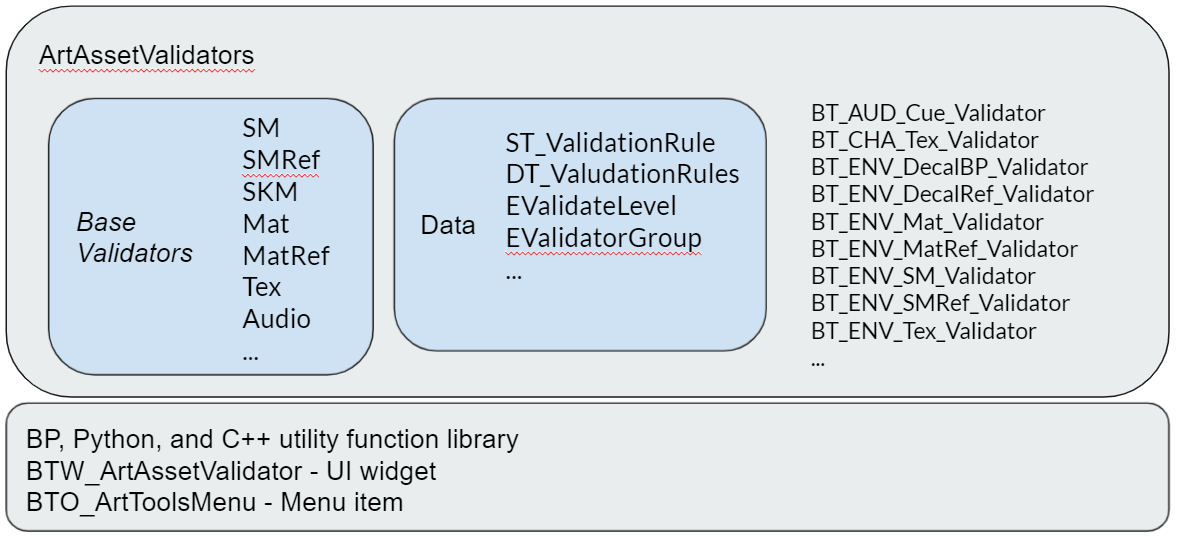
UE Art Pipeline Tools
Manticore Games · 2020
Asset import, validation, and automation tooling on the Unreal side
Impact
Gave 20+ artists a UE-side tool layer they use daily, with import and setup collapsed into one click. 98 data-driven validation rules catch asset problems before they reach a build, bringing daily build errors from asset issues down to near zero.
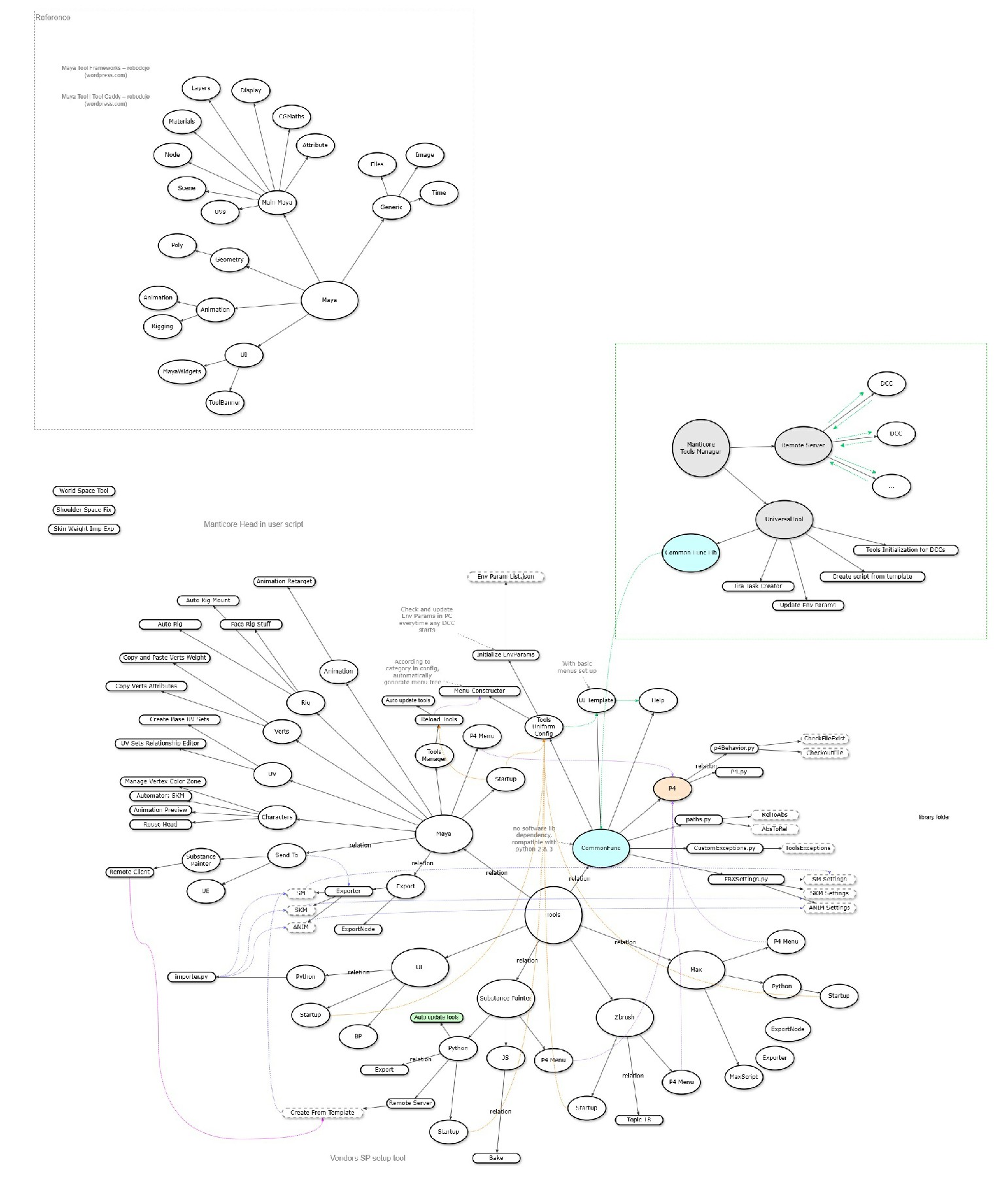
DCC Tools / Pipeline
Manticore Games · 2020
Digital content creation tools and pipeline integrations
Impact
Standardized artist-facing DCC workflows, reduced manual export/setup work, and made pipeline tools easier for technical artists to maintain and extend.
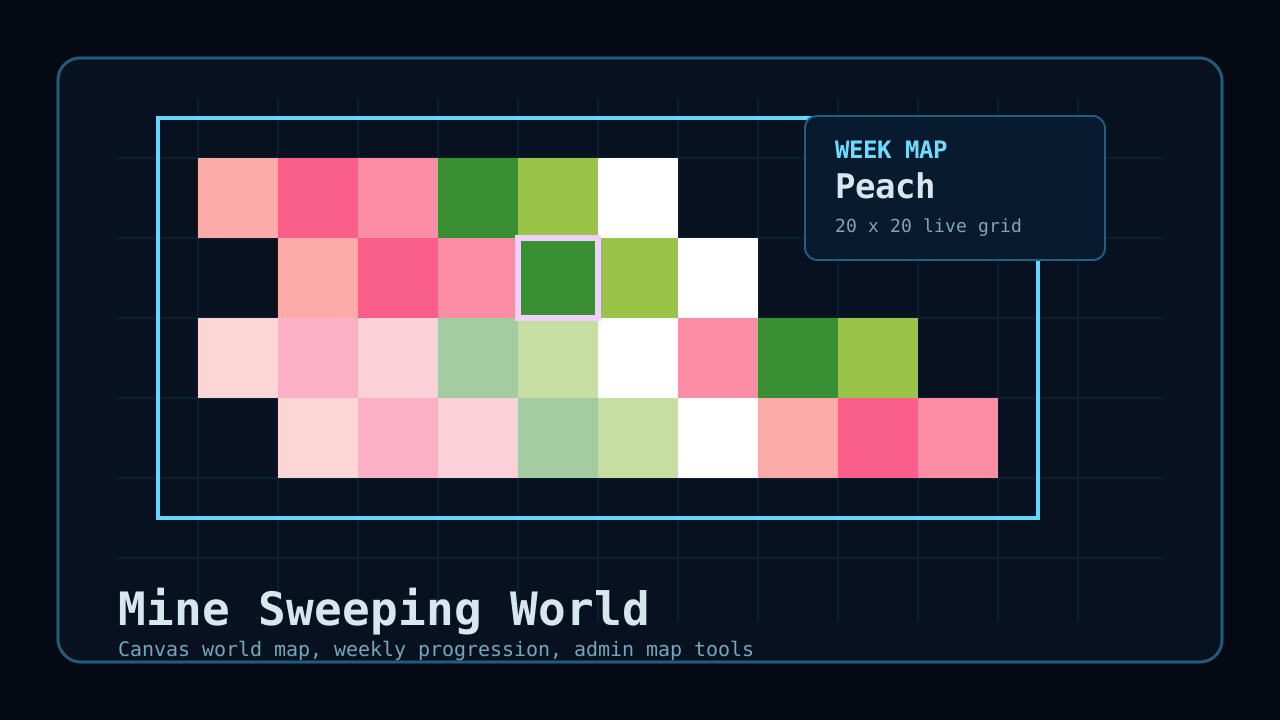
Mine Sweeping World
Personal Project · 2026
Web-based minesweeper world with weekly maps, persistent progression, and admin authoring tools
Impact
Turned a simple Minesweeper prototype into a live, persistent web game and a production-style exercise in systems thinking, tool building, deployment debugging, and AI-native rapid iteration.